Website Security Best Practices in 2026: The Ultimate Protection Guide
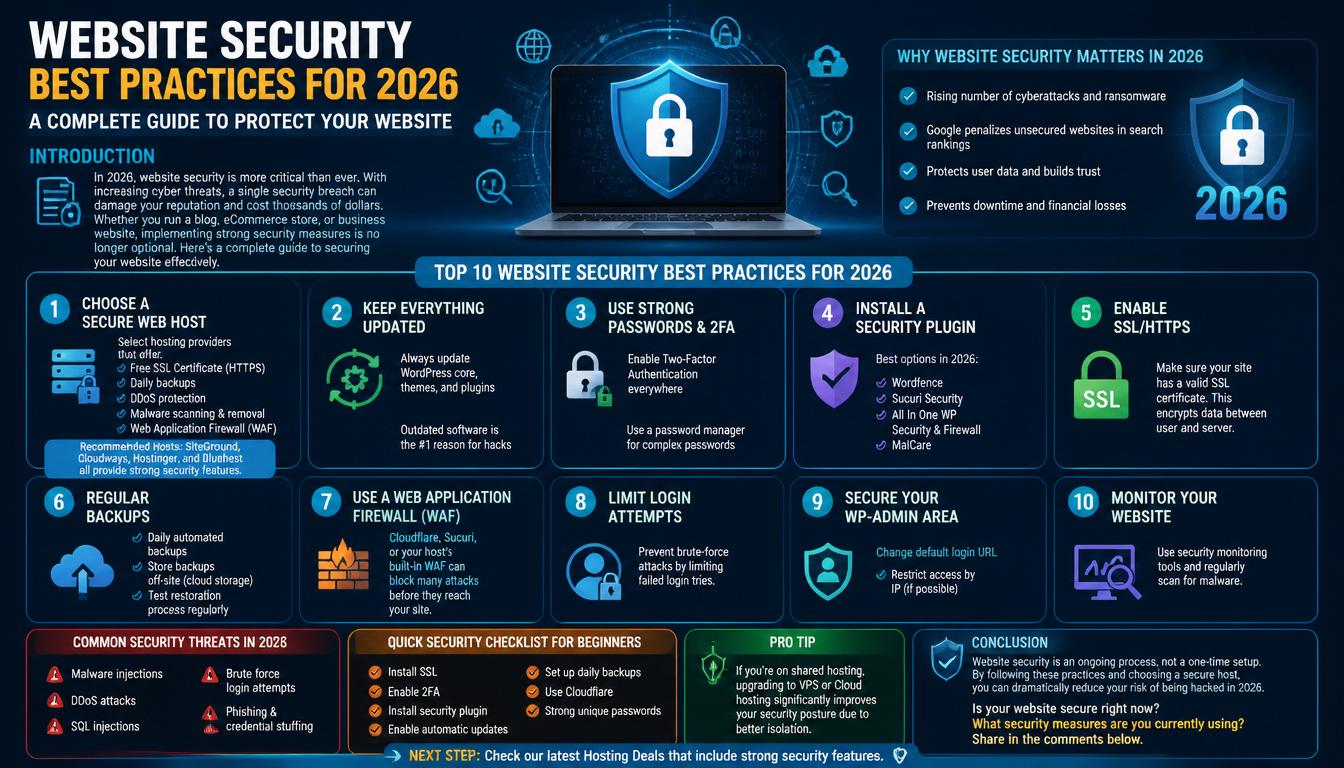
In 2026, website security is more critical than ever before. With continuous automated bot attacks, sophisticated malware injections, and rising cyber threats, a single security breach can decimate your brand reputation, tank your Google search rankings, and cost thousands of dollars in recovery fees.
Whether you publish a personal blog, manage an agency portfolio, or run a high-traffic eCommerce store, implementing proactive security measures is no longer optional. At Hosting Beasts, we compiled this complete guide to help you secure your website against modern web vulnerabilities effectively.
Start With Secure Web Hosting
Your web host is your first line of defense. Selecting a web host that provides built-in Web Application Firewalls (WAF), automated daily backups, isolated server containers, and free SSL certificates eliminates up to 80% of common web vulnerabilities automatically.
Explore Hosting Packs With Free SecurityWhy Website Security Matters in 2026
Modern attacks rarely target specific websites manually; instead, automated botnets scan thousands of domains per minute looking for known core vulnerabilities, outdated plugins, or weak login credentials.
Crucial reasons to prioritize website hardening include:
- Rising Cyberattack Volumes: Automated botnets and ransomware variants aggressively target unpatched content management systems (CMS).
- Search Engine SEO Penalties: Google actively flags and blacklists compromised websites, displaying severe "This site may be hacked" warnings that drive away traffic.
- Data Protection & Privacy Compliance: Safeguard customer payment information, personal contact details, and user passwords from data breaches.
- Prevent Operational Downtime: Avoid costly business interruptions, corrupted database cleanup fees, and lost sales during sales events.
Top 10 Website Security Best Practices for 2026
1. Choose a Secure Web Host
Host-level security forms your core infrastructure. Select hosting providers that offer server-level Web Application Firewalls (WAF), automated daily backups, free SSL certificates, DDoS mitigation, and active malware scanning. Providers like SiteGround, Cloudways, Hostinger, and Bluehost deliver strong out-of-the-box protection.
2. Keep Everything Updated
Outdated software remains the number one cause of website hacks. Always enable automatic updates or routinely patch your core system, themes, and plugins. Remove any abandoned or unused extensions, as dormant files still leave backdoors open to attackers.
3. Enforce Strong Passwords & 2FA
Enforce Two-Factor Authentication (2FA) for every administrative account. Require users to store complex, 16+ character passwords using dedicated password managers, and never use default usernames like "admin" or your domain name.
4. Install a Dedicated Security Plugin
If you use a CMS like WordPress, deploy a trusted security plugin for active file integrity monitoring, real-time firewalls, and login defense. Top recommended options include Wordfence, Sucuri Security, All In One WP Security, and MalCare.
5. Enable SSL / HTTPS Encryption
Ensure your domain enforces HTTPS encryption using a valid SSL/TLS certificate. SSL encrypts sensitive communication between visitor web browsers and your server, preventing eavesdropping and man-in-the-middle attacks.
6. Set Up Automated Off-Site Backups
Maintain daily automated backup routines and store backup archives in external cloud locations (such as Google Drive, Amazon S3, or Backblaze). Periodically test restoring a backup to ensure business continuity if recovery becomes necessary.
7. Implement a Web Application Firewall (WAF)
Deploy a cloud firewall provider like Cloudflare or Sucuri. A cloud-level WAF filters malicious bot traffic, blocks SQL injection payloads, and absorbs volumetric DDoS attacks before malicious packets reach your main web server.
8. Limit Failed Login Attempts
Brute-force attacks utilize dictionary bots to guess passwords repeatedly. Configure login attempt limits (e.g., blocking an IP address after 3 consecutive failed attempts) to neutralize automated password guessing.
9. Harden Your Administrative Area
Protect access to your admin dashboard by changing the default login URL path, restricting admin access by IP address, disabling direct file editing inside dashboard menus, and setting auto-logout timers for idle users.
10. Active File Integrity & Malware Monitoring
Set up automated file integrity scans to detect unauthorized file modifications instantly. Real-time alerts allow you to isolate and clean unauthorized code injections before search engines flag your domain.
View Secure Web Hosting DealsCommon Web Security Threats in 2026
| Threat Type | How It Works | Primary Risk Level | Recommended Countermeasure |
|---|---|---|---|
| Malware Injections | Injects malicious code into core site files to steal data or redirect visitors. | Critical | File Integrity Scans & Regular Updates |
| Brute-Force Attacks | Automated bots guess passwords rapidly across admin accounts. | High | 2FA & Limit Failed Login Attempts |
| DDoS Attacks | Floods your web server with fake traffic to force site crashes. | High | Cloudflare WAF & Host DDoS Mitigation |
| SQL Injections (SQLi) | Exploits weak form inputs to view or wipe backend database records. | Critical | WAF Filtering & Input Sanitization |
| Credential Stuffing | Uses leaked password dumps from other site breaches to access accounts. | High | Multi-Factor Authentication (2FA) |
Quick Beginner Security Checklist
- ✓ Activate Free SSL: Ensure your domain forces HTTPS encryption across all pages.
- ✓ Enable 2FA Everywhere: Force Multi-Factor Authentication on all admin and editor user profiles.
- ✓ Install a Security Plugin: Deploy Wordfence, Sucuri, or MalCare for active scanning.
- ✓ Automate Core & Plugin Updates: Turn on automatic security patches for extensions.
- ✓ Configure Daily Off-Site Backups: Store full database and file snapshots securely.
- ✓ Connect Cloudflare WAF: Route domain DNS through Cloudflare for free proxy protection and DDoS defense.
- ✓ Eliminate Predictable Passwords: Audit user accounts and remove default "admin" usernames.
Standard Shared Security
- Cost-effective entry point for starter blogs
- Server firewall managed by hosting provider
- Sufficient for low-traffic sites without payment forms
- Vulnerable to resource drain if co-tenants are targeted
VPS & Cloud Isolated Security
- Virtual isolation prevents cross-account malware contamination
- Dedicated IP address protects email and domain sender reputation
- Full control over custom firewall rules and PHP security modules
- Superior defense posture for eCommerce stores and business apps
Final Verdict
Website security is an ongoing operational process rather than a one-time setup. By following these top 10 best practices, keeping software updated, enforcing strong multi-factor authentication, and hosting your site on a secure infrastructure, you dramatically minimize the risk of being hacked in 2026.
Upgrade to Secure Web Hosting TodayFrequently Asked Questions

Snober Kanwal
Tech Reviewer, Content SpecialistI specialize in tech journalism and product reviews at Hostingbeasts. By breaking down digital trends, gadgets, and software into easy-to-digest guides, I create SEO-optimized content that ranks on search engines, builds consumer trust, and drives high-intent affiliate traffic for global audiences.
Comments 0
No comments yet. Be the first to share your thoughts!